
 Get Financing
Registration & Account Settings
Register On TractorHouse.com
You must register for an account before you can buy and sell agricultural equipment on TractorHouse.com.
- Click the Register link at the top of the homepage.
- Enter your email address and name, create a password, and submit the form.
- You will receive a verification email and further instructions if necessary. Follow the instructions to complete your registration.
My Account
Buying
TractorHouse AI

TractorHouse Mobile App
Watch Lists
Create Equipment Watch Lists - See an item you'd like to save for later? When logged in, you can add one or more watch lists for equipment, vehicles, and attachments of interest.
- On any equipment listing, click the Add To Watch List heart icon.
- Click Close to save the item to your watch list.
- To create a separate watch list with a custom name (like "Tractors" or "Combines Nearby"), click the Add To Watchlist heart icon on any listing, click Create New Watch List, enter a name for your new watch list, and click Save.
Access My Watch Lists - Use any of these options to access your watch lists:
- Click the Watch List link in the top left corner of the page.
- Click your username in the top left corner of the page and select View My Watch List.
- Click the Watch List icon in the floating menu at the bottom of the page.
Delete Items In Watch Lists - Access your watch list and follow these steps:
- Find the item you want to remove.
- Click the Delete From Watchlist heart icon.
- Uncheck the Watch List checkbox.
- Click Close.
Add Custom Notes To Saved Listings - Want to remember something about a certain piece of equipment in your watch list? Click to view the listing for any item in your watch list and follow these steps:
- Click the Click To Add Personalized Notes About This Item link.
- Type your note.
- Click the Save button or click Cancel to discard the note.
Edit Or Delete Custom Notes On Saved Listings - Click to view the listing for the item in your watch list.
- To edit a note, click the Edit link, make changes to the note, and click the Save button.
- To delete a note, click the X button next to the note.
Get Updates About Price Drops - When you add an item to your Watch List (see information above), you will automatically receive an email notification if the machine's asking price is lowered.
Get Personalized Equipment Recommendations
You can receive text or email notifications about farm equipment based on your interests. Log in and follow these steps to receive text messages:
- Click More in the upper right corner of the homepage or tap the Menu icon in the app.
- Select Sign Up For Text Messages.
- Review the terms and conditions, enter your mobile phone number, and click Sign Up.
To receive email messages:
- Click the Email Signup link on the homepage or tap the Menu icon in the app and select Get Weekly Updates.
- Enter your email address and click Sign Up Now.
Get Auction Notifications
TractorHouse.com allows you to track items for sale in AuctionTime.com online-only auctions or Equipmentfacts.com live simulcast auctions. You can choose to receive text and/or email alerts when you've been outbid, when bidding has started for a specific event or lot, when a lot will come up for sale soon, and more. Log in and follow these steps:
- Click your account name in the top left corner of the homepage.
- Click Communication Preferences.
- Click Notification Settings to show options for Equipmentfacts and AuctionTime.
- Choose Equipmentfacts or AuctionTime and make your notification selections.
Get Text Alerts For New Listings
You can receive text alerts whenever a listing is added to TractorHouse.com that matches your interests. Log in and follow these steps:
- Click your account name in the top left corner of the homepage.
- Click Alerts For New Listings.
- Click the Add An Alert button.
- Enter the equipment, category, make, model, and year range you're looking for.
- Use the toggle buttons to enable text alerts when new listings are posted and automatically add new machines matching your criteria to your Watch List.
- Optionally, specify limits on pricing, distance from your location, and type of sale (retail or auction).
- Click Save Changes when you're done.
Manage Text & Email Notifications
Save Searches
Access & Manage Saved Searches
Want-To-Buys
Post Want-To-Buys – If you're interested in purchasing a specific type of equipment but you don't see exactly what you're looking for listed on the site, you can post a Want-To-Buy to let sellers know what you need. Log in and follow these steps:
- Click the Post A Free Want To Buy link on the homepage.
- Choose Equipment, Attachments, or Parts.
- Select the make, model, category, quantity, and other criteria you're looking for.
- Specify how soon you plan to buy.
Each Want To Buy will remain active for 30 days unless you delete it sooner. You will be notified when new equipment matching your criteria appears on the site.
Manage Want-To-Buys – Click your account name in the top left corner of the homepage and select My Want-To-Buys. Here, you can view and delete existing Want-To-Buys or click the Post A Want-To-Buy button to add another.
Selling
Equipment Valuations

Use VIP For Free Equipment Valuations – Value Insight Portal (VIP) is the fastest way to get accurate valuations on machinery, trucks, and more—for free. Log in and use one of these methods to access VIP:
- Click VIP Values on the floating menu at the bottom of any webpage
- Click your account name in the top left corner of the homepage and select VIP Portal
- Go directly to VIP.TractorHouse.com
Sell Farm Equipment On TractorHouse.com
Before advertising in TractorHouse magazine and on TractorHouse.com, prepare the asset you want to sell. Preparation usually includes conducting thorough maintenance checks and cleaning all components and tags. After that, gather ownership documents, maintenance logs, and warranties to have them handy when submitting your asset to sell. Follow these steps once it's ready:
- Log in to TractorHouse.com.
- Click the Sell Your Equipment button on the homepage.
- Click the Get Started button.
- Submit up to 40 high-resolution asset photos and videos. These can include photos of inspection reports, warranty documents, and other relevant information.
- Provide information such as Manufacturer, Model, Category, Condition, and Serial Number.
- Add asset information in the Description window. You can include commonly used keywords for characteristics likely to attract buyers searching for farm equipment, such as "low hours," "well-maintained," or "recently serviced."
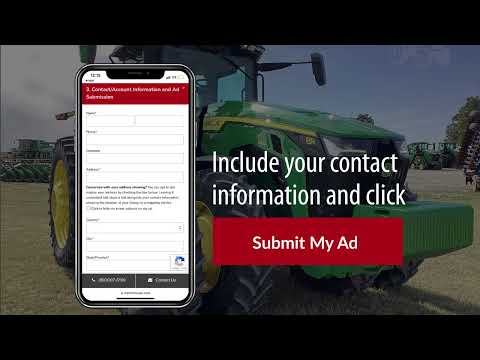
- Add your contact information so potential buyers and TractorHouse personnel can easily reach out to you.
Get Farm Equipment Auction Results
- Navigation